
For parents with an IEP
An IEP goal tracker that fits into family life
Your child's IEP sets out what everyone is working towards. Pravnya is an IEP goal tracker for parents: it keeps those goals in one private place, so you can track IEP goals at home and see how your child is doing between school reviews.
Free to start · No credit card · Private by design
The IEP is written once, but the work happens every day
An IEP (individualised education plan) is usually reviewed a few times a year. In between, it can sit in a folder while daily life carries on. Teachers, special educators and therapists each see part of the picture, and parents see the rest at home.
When the next meeting comes round, it can be hard to remember what changed. Was that new word in March or May? Did the handwriting goal move forward, or was it a good week? Without notes, the conversation leans on memory.
What parents can bring to an IEP review
Schools see your child in one setting. You see them at home, at the park and with family. Short notes on what you notice give the team a fuller view, and help you ask clearer questions.
- Moments when a goal skill showed up at home
- How much help your child needed, and how they responded
- Goals that feel stuck, or ones that seem ready to move on
IEPs in India and the UAE
In India, some inclusive schools write IEPs, and many children also have plans from a therapy centre or special educator. In the UAE, schools commonly write IEPs for students of determination. Either way, families often end up with goals spread across several documents. Keeping them together makes it easier to follow what each goal is for and how it is going.
How Pravnya helps
One place for what happens in therapy and at home.
Step 1
Upload the IEP
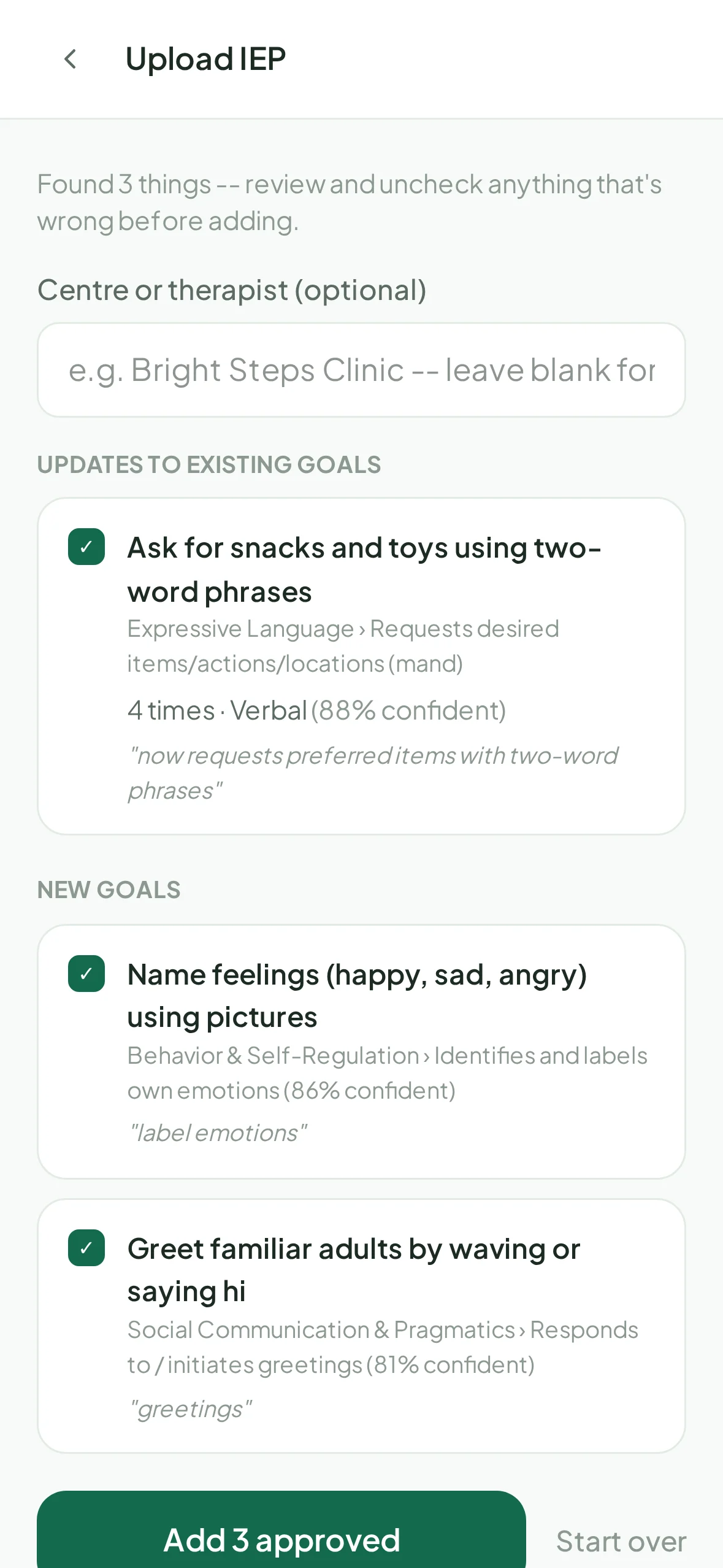
Add a PDF or a photo of your child's IEP or therapy plan, at setup or any time later. Pravnya finds the goals in it, and progress updates on goals you already have. You review the list and add only what's right.
Step 2
See every goal in one list
The Goals screen shows each goal with its developmental area, skill, number of entries and where it came from, such as an IEP upload or your care team. Open a goal to see recent entries or log something by hand.
Step 3
Log what you notice at home
Write a quick note, snap a photo of a worksheet, or record a voice note. Pravnya's AI matches it to the right IEP goals and proposes entries. Each suggestion shows what it's based on and how confident it is. Nothing is saved until you approve it.
Step 4
Follow progress over time
Growth shows each goal against your child's own history, never against other children, in plain words like "Getting stronger" or "Still building". It's a calm way to prepare for the next review.
Your child's record is never sold or used to train AI, and you decide who sees it. Read our privacy promise
Questions
What parents ask.
Yes. You can upload an IEP or therapy plan when you set up, or later when a new one arrives. Pravnya shows new goals and updates to existing goals separately, so you choose what to add.
No. The IEP belongs to your child's school and care team. Pravnya helps you keep track of the goals and what you observe at home, so you can bring clearer notes to the people who write it.
No. Pravnya organises what you and your child's care team record. It does not assess or diagnose. For questions about your child's development, talk to their therapist, teacher or doctor.
Only if you invite them. You can invite a therapist to the care team by email and remove anyone at any time. Your data is never sold or used to train AI models.
Pravnya works in any web browser and as an Android app on Google Play. It launched in India and is also used by families in the UAE. It's free to start, with no credit card needed.